

✓Listed in the third-party addon-scraper source of Add-on Market for Zotero
Translate PDFs in Zotero without leaving your library
Use this Zotero PDF translator plugin to translate complete PDF attachments in Zotero, rather than only selected text. Built for full-document research workflows, it adds a translated PDF, a source-and-translation bilingual PDF, and Markdown back to the same item.
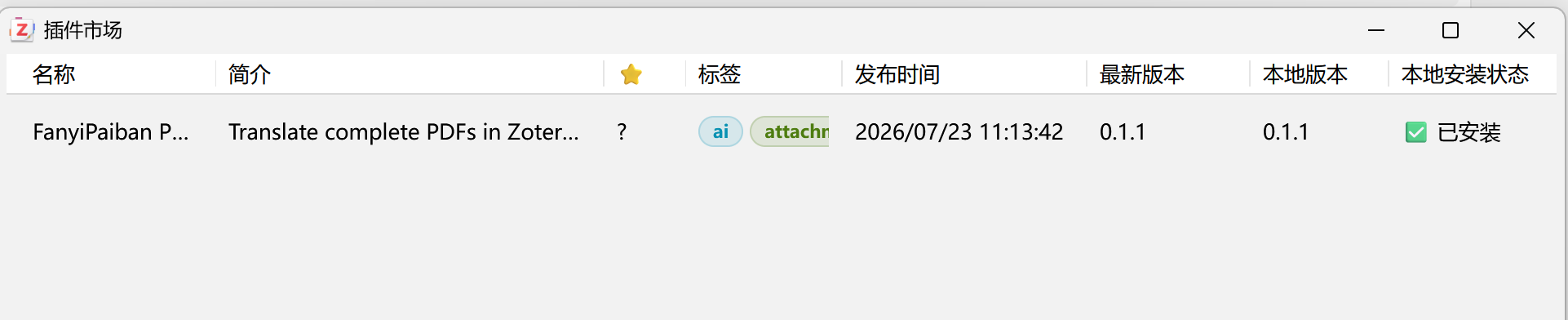
addon-scraper source. Search for the plugin name to install it.Start your first Zotero PDF translation in three steps
Add-on Market is recommended for easier updates. A direct XPI download remains available for manual installation.
Install Add-on Market
Download and install Add-on Market for Zotero. Existing users can move directly to the next step.
Find FanyiPaiban
Select the addon-scraper source, search for FanyiPaiban PDF Translator, and install it.
Connect a dedicated API key
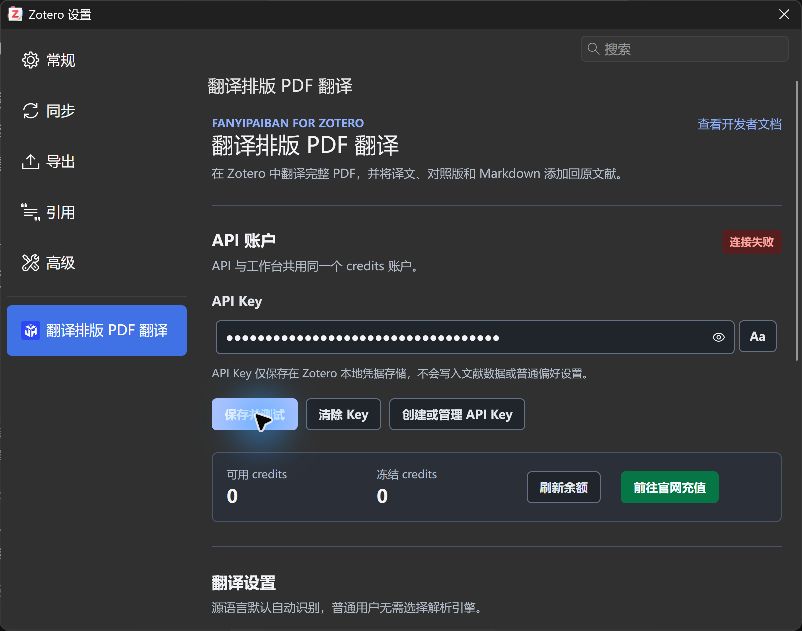
Create a key in the Developer Center, save it in the plugin settings, test the connection, and choose the target language and output formats.
Keep the source PDF and every result under one Zotero item
The plugin works with Zotero items and local PDF attachments, making it suitable for research papers, reports, manuals, and long-form reference material.
Select a PDF or parent item
Use a local PDF directly, or select a parent item that contains one local PDF. When several PDFs exist, the plugin asks you to choose explicitly.
Detect the source language
Simplified Chinese is the default target language. The plugin checks the API key and credits before submission, without asking users to select a translation engine.
Add results back to Zotero
A translated PDF is always generated. A bilingual PDF and Markdown are optional, and completed files are stored as new attachments under the source item.
One task can produce three useful files
Output choices are fixed when the task is submitted. If Zotero restarts, task recovery continues with the original choices.
Stop failures at a clear checkpoint
Authentication, credits, and task state stay in one workflow. When a network interruption makes submission uncertain, the same Idempotency-Key is reused to reduce duplicate tasks and duplicate charges.
- The API key remains in Zotero local credential storage.
- After a server task ID is received, Zotero can resume polling and downloads after restart.
- Only one local translation workflow runs at a time, reducing repeated submissions.
- The selected PDF uploads only after the user starts a translation.
A practical design for real research libraries
Security credentials remain separate from bibliographic data, and file uploads occur only after an explicit user action.
The key stays in Zotero settings
The API key is not written into item fields, attachment titles, regular preference exports, or task recovery records.
Up to 300 MB per file
Files stream from disk instead of loading the whole PDF into JavaScript memory. Oversized files are blocked before submission.
Task progress can be recovered
The server returns a task ID after accepting a job, allowing the plugin to resume polling, downloading, and attachment creation after restart.
What to know before installing
The plugin is free. Translation tasks share the same credits account as the web workspace, REST API, and MCP service.
Is this plugin listed in the official Zotero plugin directory?
No. It is available through the third-party Add-on Market for Zotero using the addon-scraper source, where users can search, install, and update the plugin.
Do I have to install it through Add-on Market?
No. You can also download the XPI from the GitHub Releases page and install it from Zotero under Tools > Plugins > Install Plugin From File.
Does it translate a full PDF or only selected text?
It submits the complete local PDF attachment to the document translation workflow and adds the finished files back to the source item. It is designed for full-document translation, not sentence-by-sentence lookup.
Which Zotero versions are supported?
The manifest targets Zotero 7 through Zotero 9. The current build has been manually tested on Windows with Zotero 9; validation of other versions and platforms is ongoing.
Can it translate scanned PDFs?
Yes. Scanned and image-based PDFs can use the service OCR workflow. Results depend on scan clarity, page structure, and language quality.
How do I create or revoke an API key?
Create a dedicated key in the LingoBridge Developer Center. A separate Zotero key is recommended so it can be revoked without affecting other API or MCP integrations.
Can I change the translation language?
Yes. Simplified Chinese is the default target language, and other target languages can be selected in the plugin settings.
Need help with installation or a task?
Include your Zotero version, plugin version, and a redacted error message. WeChat: melevelalk, nj-juhuizhineng. Email: 124005421@qq.com.
Run the full Zotero translation workflow
Use a representative research paper or PDF attachment to verify translation quality, bilingual review, and exported results.